




Last updated: November 16, 2026
Complete Guide to WordPress Performance Optimization for Enterprise Sites
Enterprise WordPress websites may need to support large numbers of simultaneous visitors. As traffic increases, performance becomes an important business requirement. Page load delays can negatively affect conversion rates and user experience. WordPress performance optimization helps organizations improve website speed, caching efficiency, and infrastructure scalability. This guide explores practical strategies for improving WordPress site speed, implementing effective caching mechanisms, and supporting WordPress scalability for high-traffic websites.
Whether you’re managing an e-commerce platform, a media website, or a SaaS application with demanding uptime requirements, the principles in this guide can help you plan and improve your WordPress infrastructure.
Understanding WordPress Site Speed and Performance Challenges at Enterprise Scale
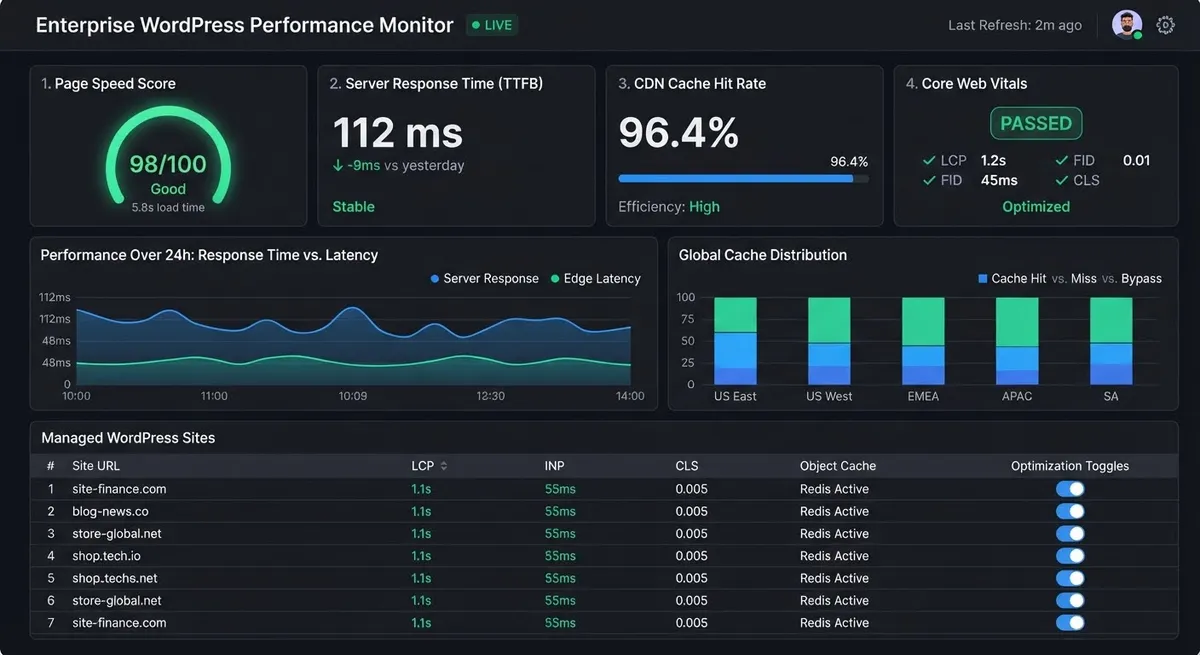
Enterprise WordPress sites face unique performance challenges that differ significantly from small business installations. As traffic scales, the default WordPress architecture, which executes PHP code on every page request, becomes increasingly inefficient. Without proper optimization, your server resources deplete quickly, response times degrade, and user experience suffers dramatically.
The core issue centers on how WordPress generates pages. Each visitor request triggers database queries, plugin execution, and theme processing. As website traffic increases, this process becomes computationally expensive, particularly when many visitors request pages simultaneously. Google uses Core Web Vitals as part of its page experience signals, making website performance an important consideration for both user experience and search visibility.
Enterprise sites running WordPress typically encounter these bottlenecks:
- Unoptimized database queries causing slow page generation
- Large, uncompressed image files consuming bandwidth
- Missing or inefficient server-side caching layers
- Poorly configured CDN implementation or no CDN at all
- Bloated plugin ecosystems with unnecessary functionality
- Inadequate server resources for peak traffic periods
Addressing these issues requires a comprehensive WordPress performance strategy rather than isolated fixes. The most successful enterprise implementations combine multiple optimization techniques into an integrated system.
Implementing Effective WordPress Caching Strategies
Caching is the single most impactful WordPress performance optimization technique available. Rather than generating pages fresh on each request, caching stores pre-rendered versions that serve instantly. For enterprise sites, implementing proper caching can improve server response times by reducing the need to process repeated requests from scratch.
Three caching layers work together in an effective WordPress caching strategy:
Page-Level Caching
Page-level caching stores fully rendered HTML pages, eliminating the need for WordPress to process PHP code entirely. When a user requests a page, the web server serves the cached HTML directly. This provides dramatic speed improvements. Solutions like WP Super Cache, W3 Total Cache, and LiteSpeed Cache implement this approach. For enterprise sites, page caching can improve Time to First Byte (TTFB) by serving stored HTML pages without requiring WordPress to generate each page from scratch.
Practical Implementation:
To configure page caching in WordPress, install a caching plugin that is compatible with your hosting environment. For example, WP Super Cache provides page caching options, while LiteSpeed Cache works with LiteSpeed servers for its server-level caching features.
After activating the plugin:
- Open the plugin’s settings in the WordPress dashboard.
- Enable page caching using the recommended configuration.
- Save the settings and clear the existing cache.
- Test important pages, including the homepage, service pages, and contact forms.
- Check that dynamic pages, such as shopping carts and account pages, are not served from an inappropriate cached version.
Review cache behavior after website updates to ensure visitors receive current content.
Choosing the right web development partner with caching expertise ensures your implementation avoids common pitfalls like cache invalidation issues that deliver stale content to visitors.
Object Caching
Object caching stores processed data (database query results, computed values, API responses) in fast-access memory like Redis or Memcached. When WordPress needs this data again, it retrieves the cached version instead of re-executing expensive operations. For database-heavy applications, object caching can reduce repeated database queries and improve overall query performance.
Enterprise implementations often use Redis for object caching because it provides fast in-memory data access. Redis also supports persistence options, depending on server configuration. However, persistence settings and backups should be reviewed separately to help protect data during server restarts or unexpected failures.
Practical Implementation:
Redis object caching requires a Redis service supported by the hosting environment and a compatible WordPress integration.
A typical implementation involves:
- Confirming that the hosting provider supports Redis.
- Setting up the Redis service through the hosting environment.
- Installing a compatible Redis Object Cache plugin.
- Connecting WordPress to the Redis service using the correct server configuration.
- Enabling object caching and checking the connection status.
- Monitoring cache activity and testing important website functions.
The hosting configuration may vary, so administrators should follow their hosting provider’s instructions before enabling Redis.
Browser Caching
Browser caching instructs user browsers to store static assets (CSS, JavaScript, images) locally. Subsequent visits load these assets from local storage rather than requesting from your servers. Proper browser cache headers allow returning visitors to load previously stored static assets locally, reducing repeated requests to the server and improving page loading performance.
Database Optimization and Query Performance
Even with excellent caching, database performance fundamentally impacts WordPress speed. Enterprise sites can accumulate large databases containing extensive posts, comments, user records, and metadata. As these datasets grow, inefficient queries can slow database operations and affect overall website performance.
Key database optimization strategies include:
- Index Optimization: Ensure proper database indexes exist on frequently queried columns (post IDs, user IDs, post meta keys). Missing indexes can cause MySQL to scan more rows than necessary, potentially increasing query execution time.
- Query Analysis: Use MySQL’s EXPLAIN command and WordPress query monitoring plugins to identify slow queries. Focus optimization efforts on queries consuming the most execution time.
- Transients and Caching: Store computed results (category counts, top posts, aggregated data) using WordPress transients. These cached values expire after specified periods, ensuring freshness while reducing database load.
- Database Cleanup: Remove unnecessary post revisions, trashed content, and spam comments that bloat tables and slow queries.
- Query Optimization: Rewrite queries to retrieve only necessary columns and rows. Avoid multiple queries when a single JOIN could accomplish the same result.
Practical Implementation
Database administrators can use MySQL’s EXPLAIN statement to understand how a query is executed.
A basic example is:
EXPLAIN SELECT * FROM wp_posts WHERE post_status = ‘publish’;
The output provides information about the query execution plan, including the tables accessed, possible indexes, and estimated rows examined.
Use this information to identify queries that may benefit from better indexing or query optimization. Review queries before making database changes, and test any modifications in a staging environment before applying them to a live enterprise website.
At enterprise scale, database performance directly correlates with infrastructure costs. Optimized queries reduce CPU consumption and memory requirements, translating to lower server expenses alongside improved user experience.
Content Delivery Networks and Geographic Scaling
Enterprise sites serving global audiences face latency challenges. For example, users in Asia may experience noticeable delays when requesting content from US servers. Content Delivery Networks (CDNs) solve this by distributing your content across strategically located servers worldwide. When a user requests an asset, the CDN serves it from the geographically closest location, reducing latency dramatically.
For WordPress performance optimization at global scale, CDN implementation is essential. CDNs cache static assets (images, CSS, JavaScript) and sometimes entire pages, dramatically reducing server load while improving user experience across geographic regions.
Popular enterprise CDN solutions include Cloudflare, Akamai, and AWS CloudFront. Each offers WordPress-specific integration options through plugins or native APIs. At enterprise scale, CDN bandwidth costs become significant factors in infrastructure budgeting. Proper caching can help reduce CDN traffic and associated expenses.
Image Optimization and Lazy Loading
Images can account for a significant portion of a webpage’s total size. Large or improperly formatted images can increase loading times and consume additional bandwidth, particularly on websites with extensive visual content.
To improve WordPress site speed, consider these image optimization practices:
- Image Compression: Compress images to reduce file sizes while maintaining acceptable visual quality.
- Modern Image Formats: Use formats such as WebP or AVIF when supported by the website’s browsers and optimization tools.
- Responsive Images: Serve appropriately sized images based on the visitor’s device and screen dimensions.
- Lazy Loading: Defer loading off-screen images until visitors scroll closer to them.
- Image Dimensions: Specify image width and height to help browsers allocate space and reduce unexpected layout shifts.
Avoid unnecessarily delaying important above-the-fold images, especially the main hero image. Test image optimization changes to ensure they improve loading performance without affecting image quality or website functionality.
WordPress Scalability for High-Traffic Sites: Infrastructure Decisions
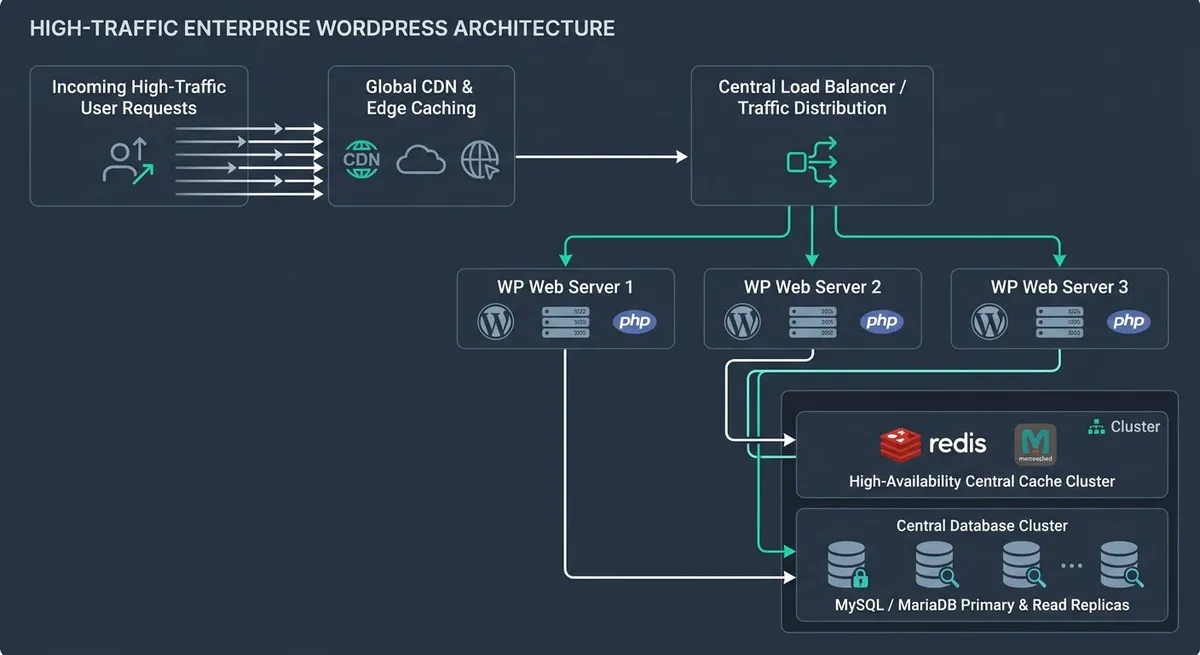
Server architecture fundamentally determines WordPress scalability for high-traffic sites. As traffic grows, you must choose between vertical scaling (larger, more powerful servers) and horizontal scaling (more servers sharing load).
Enterprise WordPress implementations typically employ horizontal scaling architectures:
- Load Balancers: Distribute incoming requests across multiple application servers, preventing any single server from becoming a bottleneck.
- Separate Database Servers: Move database workload to dedicated, optimized servers, allowing application servers to focus on request processing.
- Dedicated Cache Servers: Run Redis/Memcached on separate infrastructure, providing fast object caching without consuming application server resources.
- Stateless Application Design: Ensure WordPress instances don’t depend on local state (file uploads, session data) so they can be replaced or replicated seamlessly.
- Persistent Storage: Use shared storage (NFS, cloud object storage) for uploaded files, ensuring all servers access identical content.
Evaluating WordPress versus custom development for high-traffic applications requires understanding these architectural considerations. Some enterprise requirements exceed WordPress capabilities, necessitating custom solutions.
Monitoring, Testing, and Continuous Optimization
Performance optimization isn’t a one-time project; it requires continuous monitoring and iterative improvement. Enterprise sites must establish baselines, set performance targets, and regularly measure actual performance against those targets.
Essential monitoring practices include:
- Real User Monitoring (RUM): Collect performance data from actual website visitors to understand real-world loading experiences and Core Web Vitals. Use suitable real-user monitoring tools or performance instrumentation to collect these measurements. Google Analytics 4 can provide user engagement and website analytics data, but it should not be treated as a complete RUM solution by itself.
- Synthetic Testing: Simulate user interactions from multiple geographic locations using tools like WebPageTest to identify latency or performance issues.
- Server Monitoring: Track CPU usage, memory consumption, disk I/O, and database query performance to identify capacity constraints before they impact users.
- Cache Effectiveness: Monitor cache hit rates to ensure caching strategies deliver expected benefits. Low hit rates indicate misconfigured caching or inadequate cache sizing.
Additional tools such as GTmetrix and Lighthouse can help diagnose page performance issues, while application monitoring platforms like New Relic can help identify slow transactions and performance bottlenecks.
Practical Implementation:
A consistent monitoring process helps enterprise teams identify performance issues before they affect visitors.
Use the following tools and measurements:
- Google PageSpeed Insights: Review Core Web Vitals and page performance recommendations.
- Google Search Console: Monitor Core Web Vitals reports for eligible website pages.
- WebPageTest: Test page loading behavior from different locations and network conditions.
- Server monitoring tools: Track CPU usage, memory consumption, disk activity, and server response times.
Record baseline measurements before optimization. After implementing changes, run the tests again and compare the results to determine whether performance has improved.
Performance data should drive prioritization decisions. Focus optimization efforts on changes delivering measurable impact on actual user experience metrics rather than vanity metrics that don’t correlate with business outcomes.
When to Partner with WordPress Experts
Enterprise WordPress performance optimization demands specialized expertise. While general web developers understand WordPress basics, true enterprise optimization requires deep knowledge of infrastructure, caching systems, database architecture, and scalability patterns. Partnering with WordPress experts who understand enterprise requirements accelerates your optimization timeline while avoiding costly mistakes.
Specialized WordPress consultants can audit your current implementation, identify the highest-impact optimization opportunities, and implement solutions tailored to your specific traffic patterns and business requirements. Expert guidance can help organizations identify performance issues, prioritize improvements, and make more informed infrastructure decisions.
Particular Angles’ Approach to WordPress Performance Optimization
At Particular Angles, effective WordPress performance optimization starts with understanding each website’s infrastructure, functionality, and performance requirements. Rather than applying the same configuration to every website, optimization recommendations should be based on identified bottlenecks and measurable performance data.
A recommended optimization process includes reviewing website performance, identifying resource-heavy plugins and scripts, evaluating caching configurations, examining database performance, and assessing hosting and CDN requirements. Changes should then be tested to ensure that website functionality and user experience remain reliable.
This approach helps businesses make informed decisions about improving website speed, stability, and scalability.
Conclusion: Building High-Performance WordPress Enterprise Sites
WordPress performance optimization for enterprise sites combines multiple techniques into an integrated strategy: robust caching layers, database optimization, CDN deployment, scalable infrastructure, and continuous monitoring. No single technique solves performance challenges. Sustained excellence requires implementing all components cohesively.
Starting with page-level caching and object caching can help reduce server workload and improve overall website performance. From there, database optimization and CDN implementation address remaining bottlenecks. At the highest scale, horizontal infrastructure architecture becomes necessary.
The specific optimization roadmap depends on your current performance metrics, traffic patterns, and business priorities. Rather than implementing every possible optimization, focus on changes with the greatest impact on actual user experience and business metrics.
Enterprise WordPress performance optimization is achievable with the right combination of caching, database management, infrastructure planning, and continuous monitoring. The question isn’t whether WordPress can scale, but whether your current approach leverages the platform’s full potential. Contact Particular Angles today to discuss your WordPress performance challenges and explore optimization strategies specific to your enterprise requirements.