




Last updated: October 10, 2026
B2B SaaS Web Design Trends: UI/UX Best Practices
The landscape of B2B SaaS web design has evolved dramatically. Enterprise buyers demand more than beautiful aesthetics; they need intuitive interfaces that demonstrate clear ROI, build trust through transparent value propositions, and guide them seamlessly from awareness to conversion. If your SaaS platform’s interface doesn’t reflect current design standards, you’re leaving revenue on the table. This guide explores the most impactful B2B SaaS web design trends and UI/UX best practices that drive qualified leads and reduce friction in the sales cycle.
B2B SaaS companies face unique design challenges. Your audience includes technical decision-makers, procurement officers, and end-users, each with distinct needs and expectations. The right web design strategy balances sophisticated functionality with ease of navigation, establishes credibility through data-driven design choices, and optimizes every touchpoint for conversion.
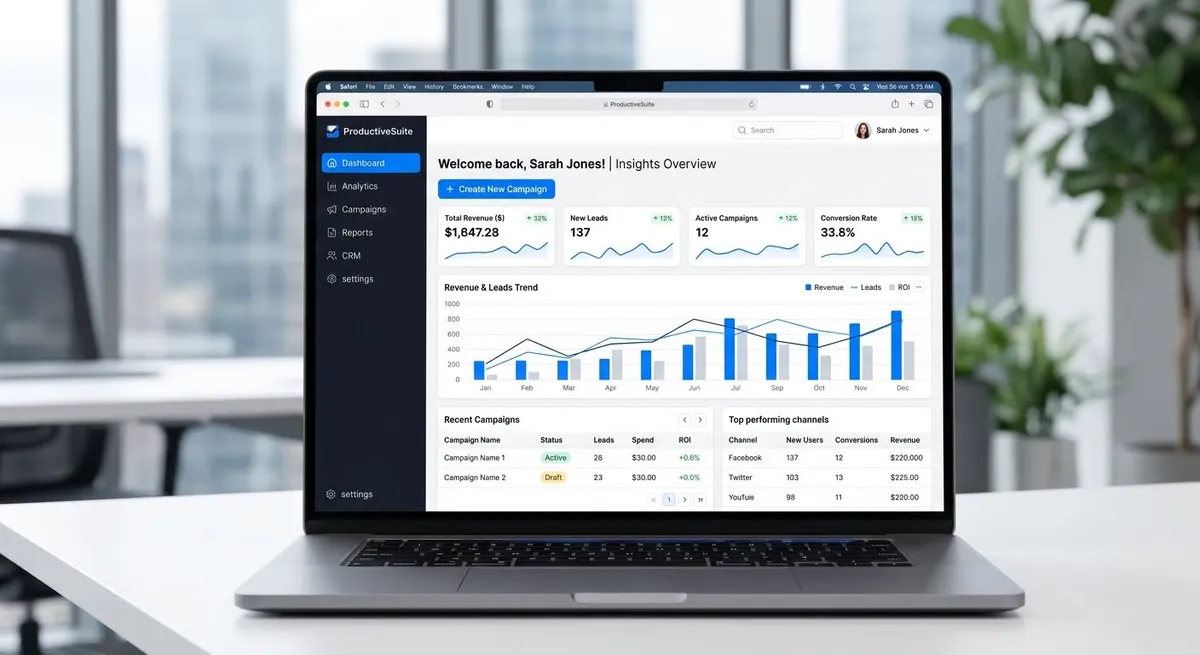
SaaS UI/UX Best Practices for Modern Platforms
Applying proven UI/UX design best practices can make complex SaaS platforms easier to navigate and understand. Clear navigation and a well-organized layout help communicate value.
The foundation of modern SaaS web design rests on five key principles:
- Progressive disclosure: Show only essential information above the fold; reveal advanced features through intuitive interaction patterns.
- Consistent design systems: Unified components across pages reduce cognitive load and build pattern recognition.
- Semantic hierarchy: Typography, color, and spacing guide users naturally toward high-value actions.
- Accessibility compliance: WCAG 2.1 AA standards ensure your platform reaches broader audiences and demonstrates professionalism.
- Data visualization: Charts, dashboards, and metrics help users understand complex information at a glance.
When you align your web design trends for 2026 with these principles, you create friction-free experiences that buyers naturally trust. Technical audiences particularly value consistency, logical workflows, and proof points embedded throughout your interface.
B2B Landing Page Design and Conversion-Focused Strategies
Conversion rate optimization helps teams evaluate whether changes to headlines, forms, and calls to action improve results. B2B landing pages should communicate the product’s value, establish trust, and make the next step easy to understand. Test different headlines, calls to action, and form layouts to determine which changes improve conversions for your audience.
Effective conversion-focused design incorporates:
- Value proposition clarity: Your headline should answer “What is this, and why should I care?” within 8 words.
- Visual differentiation: Use contrast, whitespace, and color strategically to highlight CTAs, not accidentally hide them.
- Trust signals: Position customer logos, security certifications, and third-party badges near high-intent conversion points.
- Friction reduction: Minimize form fields, simplify navigation, and remove distraction elements that compete for attention.
- Mobile-first architecture: Many B2B buyers research products on mobile devices, making responsive layouts and accessible navigation essential.
Your B2B landing page design should guide users through a logical narrative: Problem Recognition → Solution Introduction → Proof & Trust → Action. Each section builds toward the conversion goal without feeling manipulative. Conversion rate optimization mistakes often stem from cluttered layouts that prioritize feature lists over user journeys.
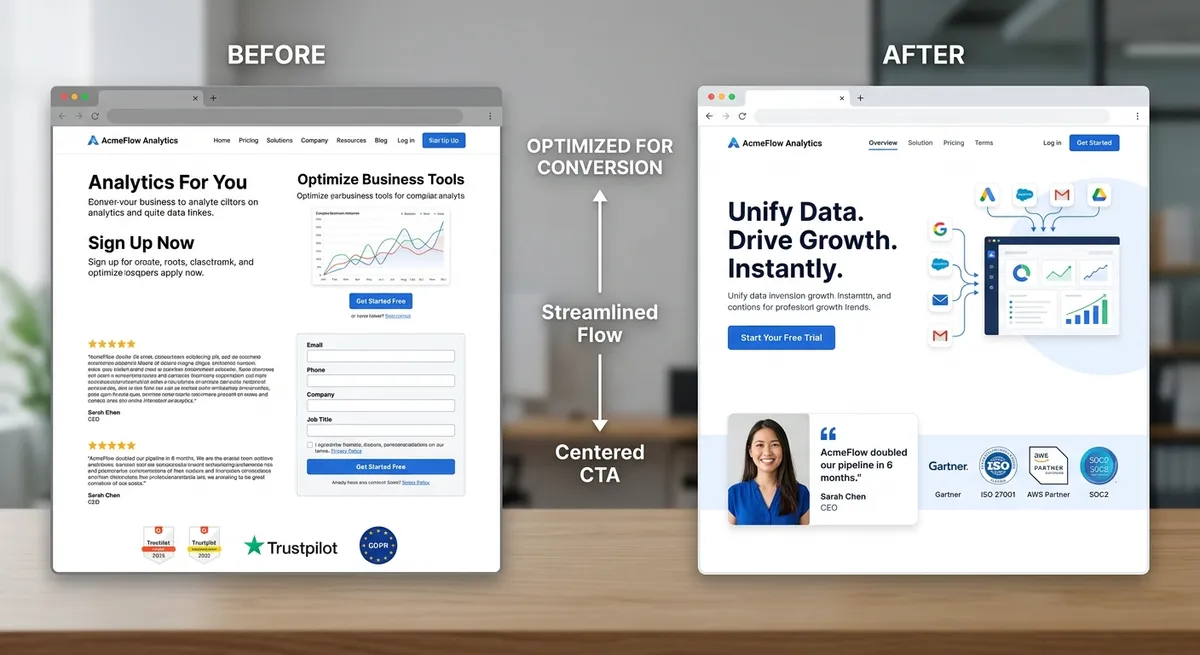
Current SaaS Interface Design Trends and Conversion-Focused Design
Micro-interactions provide users with immediate feedback when they interact with an interface. Examples include buttons that change state when clicked, loading indicators that show progress, and inline validation messages that explain how to correct form errors. Thoughtful feedback mechanisms can help users understand system responses, complete tasks confidently, and avoid common errors.
AI-Powered Design Personalization
Adaptive interfaces that personalize based on user role, behavior, or company size represent an important trend in SaaS UI/UX design. If your platform serves both technical administrators and business analysts, consider conditional navigation that displays the most relevant features for each user. This approach can reduce onboarding friction, help users find what they need faster, and accelerate time-to-value, a critical metric for SaaS retention.
Component-Based Architecture
Design systems built on reusable components (buttons, forms, cards, modals) ensure consistency while accelerating development. This approach powers successful platforms like Intercom, Zendesk, and Slack. When users encounter familiar interaction patterns across your interface, they develop mental models that reduce the learning curve significantly.
Building Trust Through Transparent Design
Enterprise buyers conduct extensive research before committing to SaaS solutions. Your web design must actively build credibility through visual and informational elements. Transparent pricing displays, customer success case studies embedded strategically, and security certifications prominently featured all contribute to trust-driven design.
For B2B SaaS platforms, transparency extends into your interface design itself. Show users exactly what data they’re sharing, how their information flows through your system, and what privacy protections you’ve implemented. Clear labeling, accessible privacy settings, and honest communication about feature limitations all strengthen perceived trustworthiness.
Custom web design versus template-based approaches often diverge on trust elements. Custom design allows you to embed trust signals strategically throughout your customer journey, whereas templates may lack nuanced personalization that enterprise audiences expect.
Mobile-First and Responsive Design Strategies
Mobile optimization is essential for B2B websites because decision-makers may research products and services using smartphones, tablets, and desktop computers. A mobile-first approach prioritizes clear content, accessible navigation, readable text, and easy-to-use forms on smaller screens before enhancing the experience for larger displays.
Responsive design requirements for SaaS web design include:
- Touch-friendly interface elements (minimum 44x44px tap targets)
- Simplified navigation that doesn’t overwhelm small screens
- Fast load times (Google’s Core Web Vitals directly impact search rankings and user perception)
- Readable typography without zooming (16px minimum body text on mobile)
- Context-aware layouts that show only critical functions on mobile, full functionality on desktop
If your SaaS platform requires users to input complex data, consider whether mobile workflows genuinely serve users or whether you should suggest desktop access for advanced tasks. Honest interface design acknowledges tool limitations and guides users to optimal environments.
Performance and Technical Optimization for SaaS Interfaces
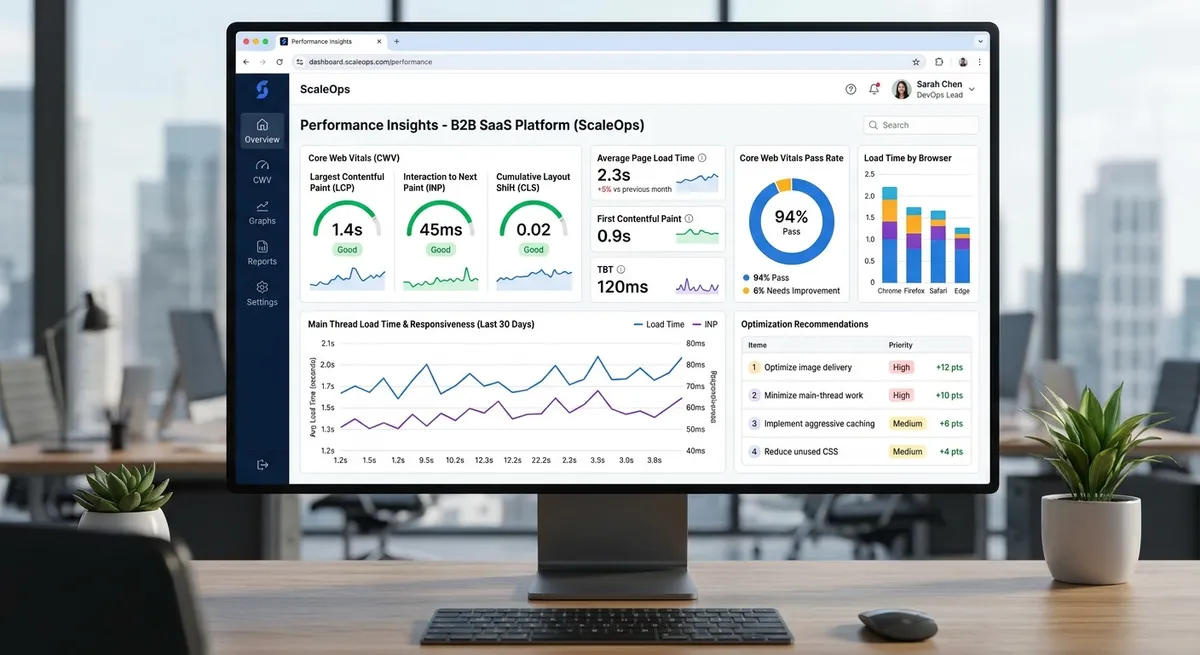
Performance isn’t just a technical metric; it’s a UX design component. Google’s Core Web Vitals measure Largest Contentful Paint (LCP), Interaction to Next Paint (INP), and Cumulative Layout Shift (CLS). These metrics help evaluate loading performance, responsiveness, and visual stability, which contribute to a better user experience. Poor page performance can frustrate visitors, increase abandonment, and negatively affect the user experience.
Technical optimization for B2B SaaS web design involves:
- Lazy-loading images and heavy components below the fold
- Minifying CSS and JavaScript to reduce initial load
- Implementing CDN strategies for global users
- Optimizing database queries in your SaaS application
- Using modern image formats (WebP with fallbacks)
When you partner with web developers who understand performance optimization, you’re investing in conversion rates and user retention simultaneously. Slow interfaces frustrate users and signal poor engineering, a critical consideration for technical buyers evaluating SaaS vendors.
Accessibility and Inclusive Design in SaaS Platforms
WCAG 2.1 AA compliance isn’t just ethical; it’s strategically essential. Enterprise procurement departments increasingly require accessibility audits before approving vendor tools. When your B2B SaaS web design includes robust accessibility features, you unlock broader markets and demonstrate commitment to inclusive practices.
Accessible SaaS design includes color contrast ratios meeting AA standards (4.5:1 for text), keyboard navigation through all interactive elements, screen reader optimization, and accessible form labels. These investments also improve general usability. Users without disabilities benefit from keyboard shortcuts, clearer semantics, and better structure.
Implementing Your B2B SaaS Web Design Strategy
Translating these best practices into action requires strategic planning. Start by auditing your current interface against modern UI/UX standards. Identify information architecture improvements, assess mobile experience friction, and evaluate whether your design system supports consistent component usage. Partner with web design agencies experienced in SaaS platforms to benchmark your approach against industry leaders.
Real-world implementation involves iterative testing. Conduct user research with your actual customer segments: technical stakeholders, business users, and procurement teams. A/B test key interface elements, measure conversion impact, and refine continuously. The most successful B2B SaaS companies treat design as an ongoing discipline, not a one-time project.
Practical Checklist for Improving B2B SaaS UI/UX
Use these practical steps to evaluate and improve your SaaS website:
- Review navigation: Make important pages, features, and product information easy to find.
- Test mobile usability: Check that menus, forms, buttons, and content work properly on smaller screens.
- Improve calls to action: Use clear, descriptive CTA text that explains the next step.
- Check accessibility: Test keyboard navigation, form labels, and text contrast.
- Measure performance: Review Core Web Vitals and investigate slow-loading pages.
- Run A/B tests: Compare one design change at a time and measure its impact on conversions.
- Review results: Track conversion rates, form completions, and user feedback before and after changes.
Start with the issues that create the most friction for your visitors, then measure the results before making further changes.
Future-Proofing Your SaaS Design System
As AI, voice interfaces, and emerging technologies reshape product design, building flexible design systems ensures your B2B SaaS web design adapts gracefully. Establish clear design principles, maintain comprehensive component documentation, and invest in design system governance that allows evolution without chaos.
The future of SaaS UI/UX best practices will increasingly emphasize AI-assisted features, natural language interfaces, and predictive design: interfaces that anticipate user needs before explicit requests. Starting with solid foundational design practices positions your platform to adopt these capabilities seamlessly when appropriate.
Whether you’re launching a new SaaS platform or optimizing an existing interface, these principles provide a strategic foundation: conversion-focused design, progressive disclosure, trust signals, performance optimization, and accessibility. Contact Particular Angles today to develop a B2B SaaS web design strategy that drives qualified leads, accelerates onboarding, and builds lasting competitive advantage through user-centered interface design.
About the Author: The Particular Angles team shares insights on web design, user experience, and digital marketing to help businesses build effective, user-friendly websites and improve their online presence.